






Best HTML to Text Converter: StripHTML vs. HTMLtoText
Converting HTML to clean, readable plain text is a common need for content creators, developers, marketers, email professionals, and anyone dealing with copied web content or rich-text outputs. Whether you’re cleaning up text from a CMS, preparing email alternatives, extracting content for AI prompts, or simply removing formatting, a reliable online tool saves time.
This article compares two popular free online options: StripHTML and HTMLtoText. Both focus on stripping HTML tags, but they differ in approach, features, and use cases.
StripHTML Overview
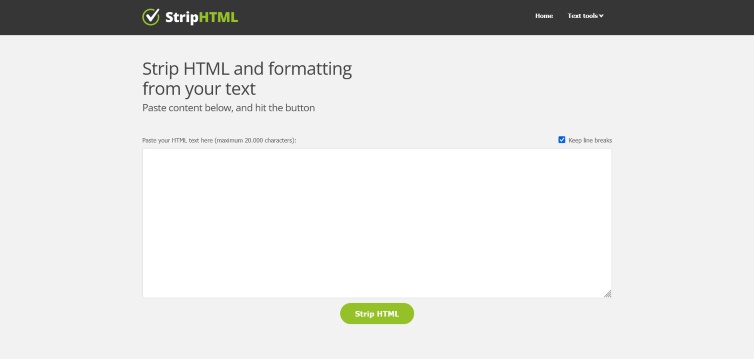
StripHTML.com is a straightforward, no-frills online HTML stripper. It has been around for years as a simple utility for removing HTML and unwanted formatting from text.
Key Features:
- Paste text and click a button to strip HTML.
- Uses PHP’s strip_tags() function plus custom code for handling formatting.
- Quick and lightweight interface focused purely on cleaning messy text (e.g., from WYSIWYG editors).
- Completely free with no signup required.
- Includes some ads on the page (as noted by the creator, who built it for personal use).
Strengths:
- Extremely simple and fast for basic stripping tasks.
- Good for quick cleanups of copied content full of tags and ugly markup.
- Reliable for everyday use where you just want plain text without extras.
Limitations:
- Limited customization options. It primarily removes tags and basic formatting but may not perfectly handle complex HTML, tables, lists, or preserve structure in all cases (as the site itself notes it’s not 100% bulletproof across all editors).
- Server-side processing (PHP-based).
- Fewer advanced controls for output formatting.
HTMLtoText Overview
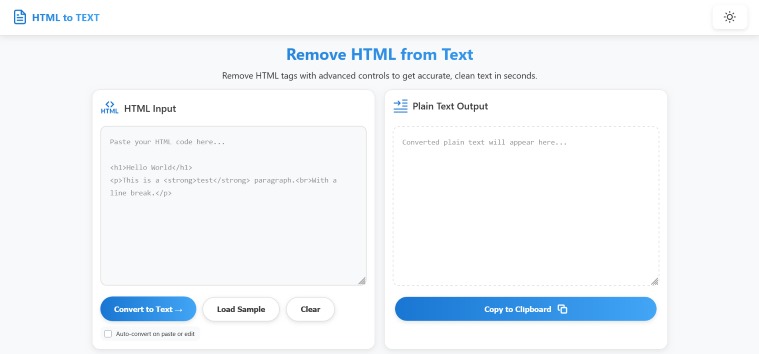
HTMLtoText.com is a more modern, feature-rich tool that emphasizes advanced controls and client-side processing. It positions itself as a precise way to remove HTML tags while allowing users to shape the resulting text.
Key Features:
- Browser-based JavaScript and DOM parsing (no server requests, faster and more private).
- Conversion Options — Customize how tags are handled: line breaks, paragraph spacing, bullets for lists, links with URLs, entity handling, and more. Adjust options and re-convert as needed.
- Handles complex HTML well, including HTML5, tables, links, lists, and full page sources.
- High performance: Tested with over 15MB of HTML input.
- Clean interface with sample loading, clear button, and one-click copy to clipboard.
- No tracking, no delays, and privacy-focused.
Strengths:
- Greater control over the output, making it suitable for professional or specific needs (e.g., preserving readable structure for emails, Notion, Word, or Markdown).
- Better at producing “accurate, clean text” with formatting intelligence.
- Client-side execution means better privacy and speed for large inputs.
Limitations:
- Slightly more steps if you tweak options (select options → convert).
- Newer or less established than StripHTML.com in some circles.
Direct Comparison
| Aspect | StripHTML.com | HTMLtoText.com | Winner |
|---|---|---|---|
| Ease of Use | Extremely simple (paste + button) | Simple with optional customization | StripHTML (basic) |
| Customization | Minimal | Advanced options (line breaks, lists, links, etc.) | HTMLtoText |
| Processing | Server-side (PHP) | Client-side (JavaScript/DOM) | HTMLtoText |
| Handling Complex HTML | Good for basic; may vary | Stronger with tables, lists, HTML5 | HTMLtoText |
| Performance | Fast for typical use | Excellent, handles very large inputs | HTMLtoText |
| Privacy | Standard (data sent to server) | Better (browser-only) | HTMLtoText |
| Ads/Frills | Some ads | Minimal/clean | HTMLtoText |
| Best For | Quick, one-off cleanups | Precise, customizable conversions | Depends on needs |
Which One Should You Choose?
- Choose StripHTML.com if you want the absolute fastest, simplest experience for basic HTML stripping. It’s ideal for occasional use or when you just need tags gone quickly without thinking about settings.
- Choose HTMLtoText.com for most users, especially if you need better output quality, control over formatting (e.g., keeping structure for readability), or privacy/performance with larger or complex HTML. Its options make it more versatile for professional workflows.
Overall Recommendation: HTMLtoText.com edges out as the stronger, more modern choice for most people in 2026 due to its customization, client-side processing, and smarter handling of HTML. However, try both—they’re free and instant. Many users keep StripHTML.com bookmarked for ultra-quick jobs.
Other Notable Alternatives
If neither fits perfectly, consider tools like HTML to Text converter, CodeBeautify, or libraries like node html-to-text for programmatic needs.
Pro Tip: For best results with either tool, test with your specific HTML (e.g., emails or articles) since output can vary slightly based on the source markup.
Clean text awaits—pick the tool that matches your workflow!

Dilawar Mughal is an accomplished author with a passion for storytelling. His works span various genres, from thrilling mysteries to heartfelt romance novels. With a keen eye for detail and a knack for character development, Sana Fatima weaves engaging narratives that captivate readers and transport them to new worlds.